# Tote Dimensions

To capture tote dimensions and weight, select 'Tote dimensions' option from the 'Dims/Weight' folder and scan the tote in question. Follow system generated instructions to complete the process.

<figure><img src="https://4069128715-files.gitbook.io/~/files/v0/b/gitbook-x-prod.appspot.com/o/spaces%2F5fCRH6psoWyRQyD8J9vh%2Fuploads%2Fog6FBsuI2KRqmIhGayVJ%2Fhh_floor_dims_tote_1.png?alt=media&#x26;token=e82202a3-add2-4efd-a742-267a71d45c28" alt=""><figcaption></figcaption></figure>

#### Step 1

Scan a tote you wish to measure.

<figure><img src="https://4069128715-files.gitbook.io/~/files/v0/b/gitbook-x-prod.appspot.com/o/spaces%2F5fCRH6psoWyRQyD8J9vh%2Fuploads%2FaA3cA6r9bOCVYfvjI49K%2Fhh_floor_dims_tote_2.png?alt=media&#x26;token=e8687665-b45b-43ea-8c57-808739b5c171" alt=""><figcaption></figcaption></figure>

#### Step 2

Sequentially enter the Length, Width, Height and Weight of the tote.

<figure><img src="https://4069128715-files.gitbook.io/~/files/v0/b/gitbook-x-prod.appspot.com/o/spaces%2F5fCRH6psoWyRQyD8J9vh%2Fuploads%2FUUi41BKivIu8nRiYaq7N%2Fhh_floor_dims_tote_3.png?alt=media&#x26;token=e02d46d1-8fef-4436-a51a-89f1aaf4288a" alt=""><figcaption></figcaption></figure>

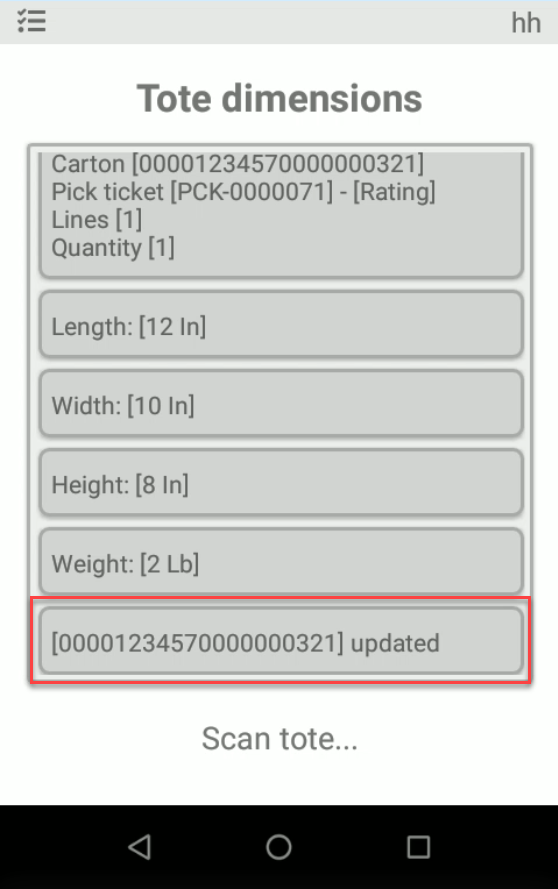
#### Result

Tote's information (dimensions) have been updated.&#x20;

<figure><img src="https://4069128715-files.gitbook.io/~/files/v0/b/gitbook-x-prod.appspot.com/o/spaces%2F5fCRH6psoWyRQyD8J9vh%2Fuploads%2FMkwidQdfZ3oXfe6d5kbJ%2Fhh_floor_dims_tote_result.png?alt=media&#x26;token=11d9fb7c-cd70-4145-90f2-304a670344c4" alt=""><figcaption></figcaption></figure>